The AI-powered chore app for couples

Split the
invisible work.

Tell AI about your home and it sets up your chores. Then log what you actually do, weight every task by effort, and see on one dial whether the housework is shared evenly.

Try Evenly on the web

Coming to iOS and Android, and works in your browser. No spam, one email when it’s ready. Privacy policy

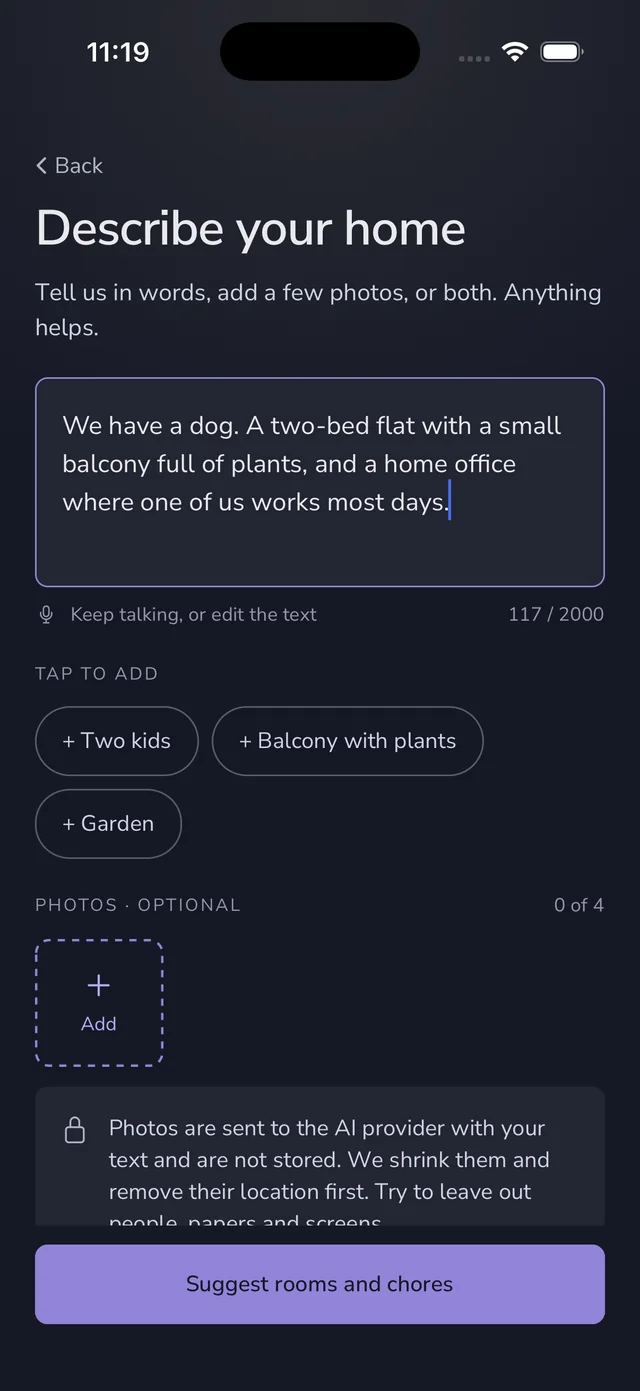
Evenly AI setup: describe your home in a few words
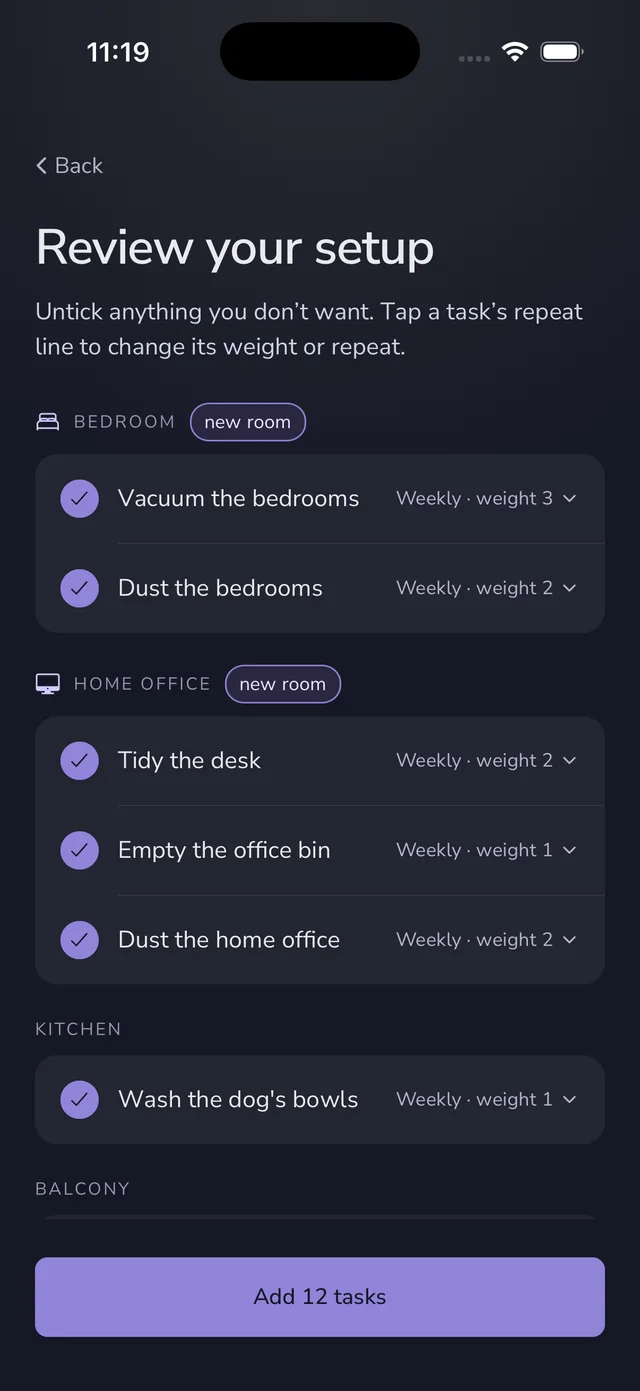
Evenly suggests your rooms, chores and effort weights; you tick what fits

50%

Alex · Sam 50%

Most weeks start lopsided. Nobody planned it that way.

Log what you actually do. One tap, weighted by effort.

Watch it settle at even. No scorekeeping required.

Why effort-weighted chore tracking

Ten minutes of bins is not an hour of scrubbing. Evenly weights every task by effort, so the split you see is the split you live.

AI setup

Describe your home.
Get your chores.

Write a sentence or two, or add a few photos, and AI suggests the rooms, the chores and a fair effort weight for each. You tick what fits and nothing is added until you do. It is optional, and the split itself is plain arithmetic on what you log.

Effort weights

Not all chores
weigh the same.

Every task carries a weight that fits your home. Start from a starter set of tasks with sensible default weights, tune them together, and add your own. Past weeks keep the weight they were logged with, so history never shifts under you.

Trends

See the drift
before it’s a fight.

Six weeks of history, broken down by day and by category. Evenly points out where the load is piling up, so you can talk about the pattern instead of last Tuesday.

Quick logging

Logging that survives
a tired evening.

One tap per task, or tick everything you did and log it in one go. Forgot last night? Catch up on yesterday, and only yesterday, so a week’s history stays honest.

Recurring chores

Set it once.
Take turns.

Make a chore repeat daily, every few days, weekly or monthly, and leave it open to either of you, pin it to one person, or rotate it between partners. A due-today list on Today shows what’s up and whose turn it is.

Cooperative mode

On the same team,
by default.

Hide the lead and show contribution only. Points you both earn go into one shared pool, and spending them on a night off or a takeaway is a joint decision.

Take a closer look.

  • Evenly AI setup: a text box where you describe your home, with quick chips and optional photos

    Describe your home

    Write a sentence or two, or add a few photos. That is the whole setup.

  • Evenly AI setup review: suggested rooms and chores, each with a repeat and an effort weight you can untick or change

    AI suggests, you decide

    Rooms, chores and a fair effort weight for each. Nothing is added until you tick it.

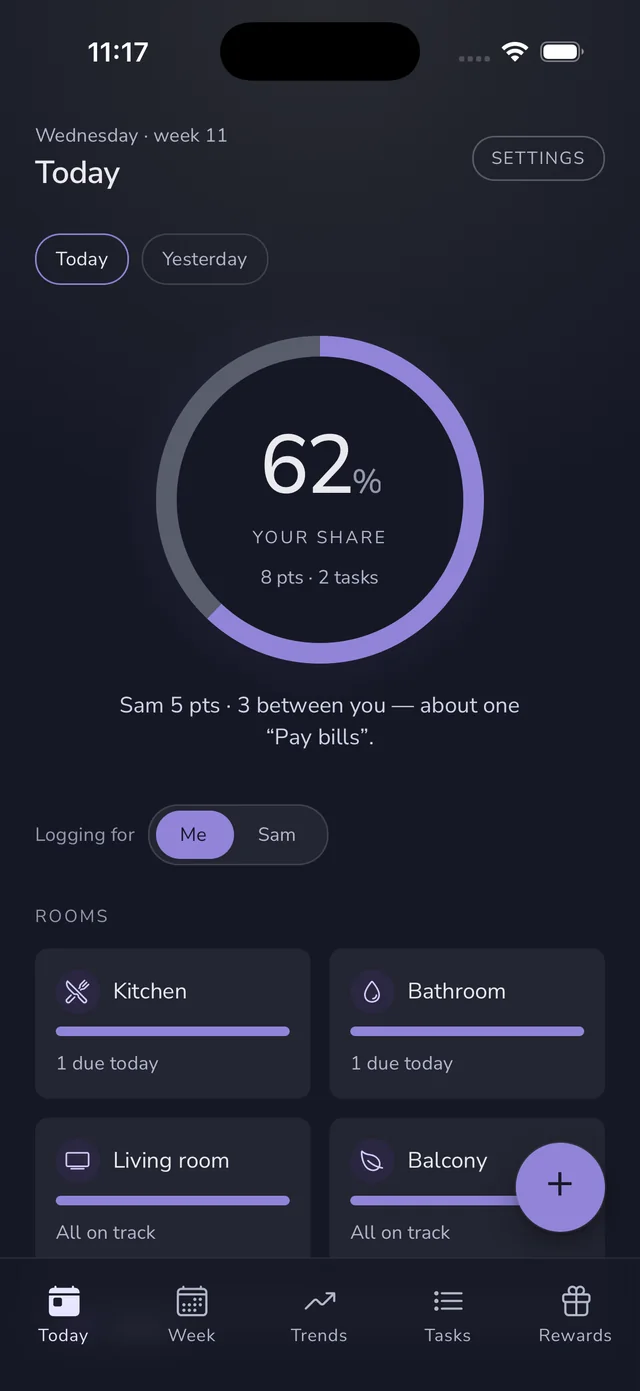
  • Evenly Today screen: a dial showing your share of today and a tile for each room with what is overdue

    Every room, at a glance

    Tap a room to log a chore for yourself or your partner. Forgot one? Catch up on yesterday.

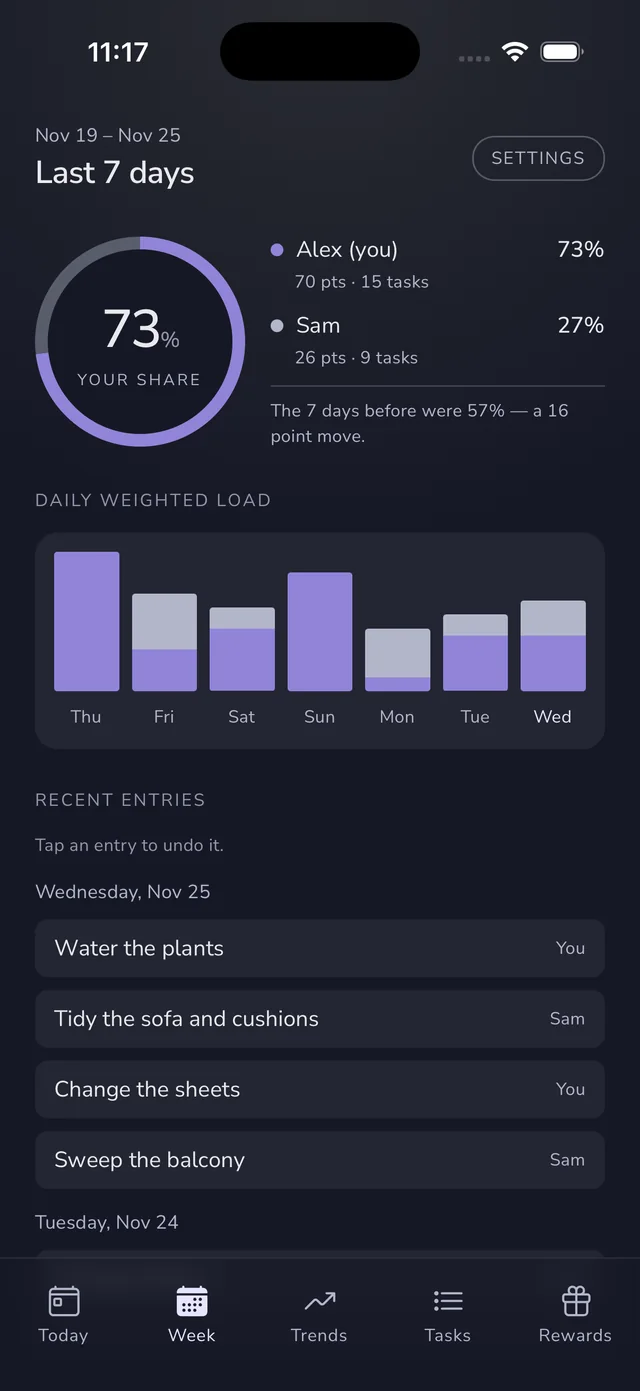
  • Evenly Week screen: the weekly split between two partners, a daily load chart and recent entries

    The week at a glance

    Who carried what, day by day, and how the split moved since last week.

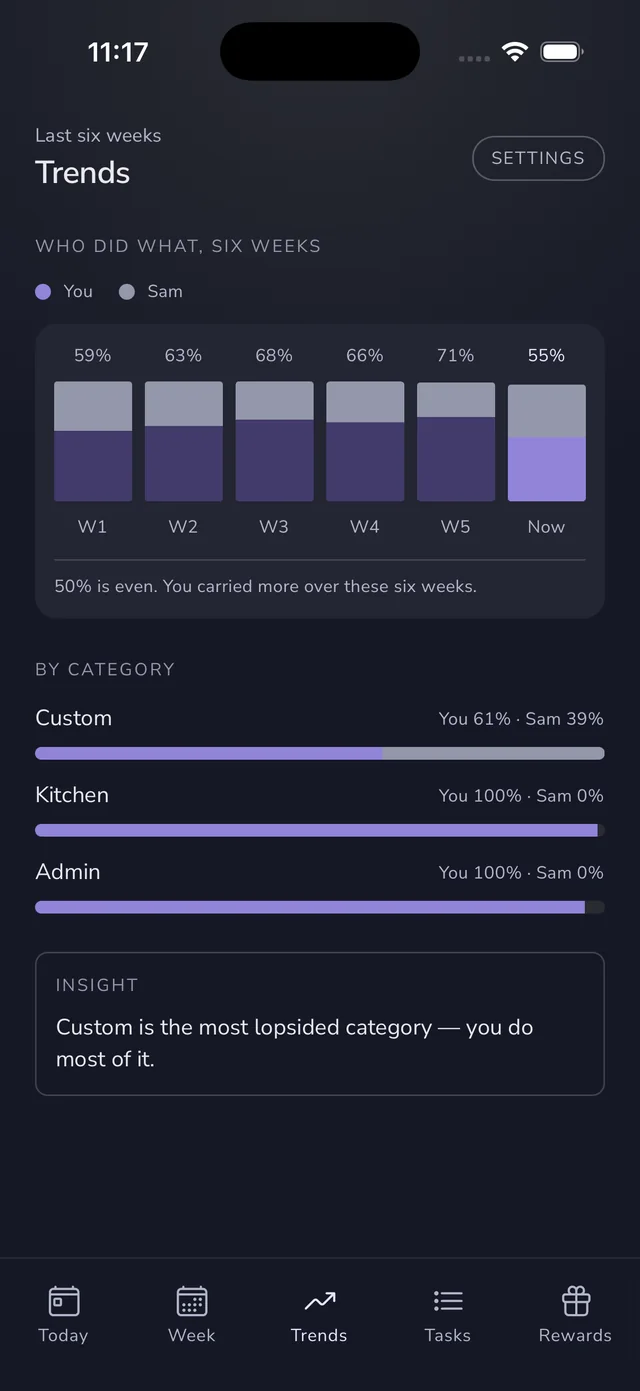
  • Evenly Trends screen: six weeks of one partner’s share and a breakdown by category

    Patterns, not arguments

    Six weeks of history, split by category, with a plain-language insight.

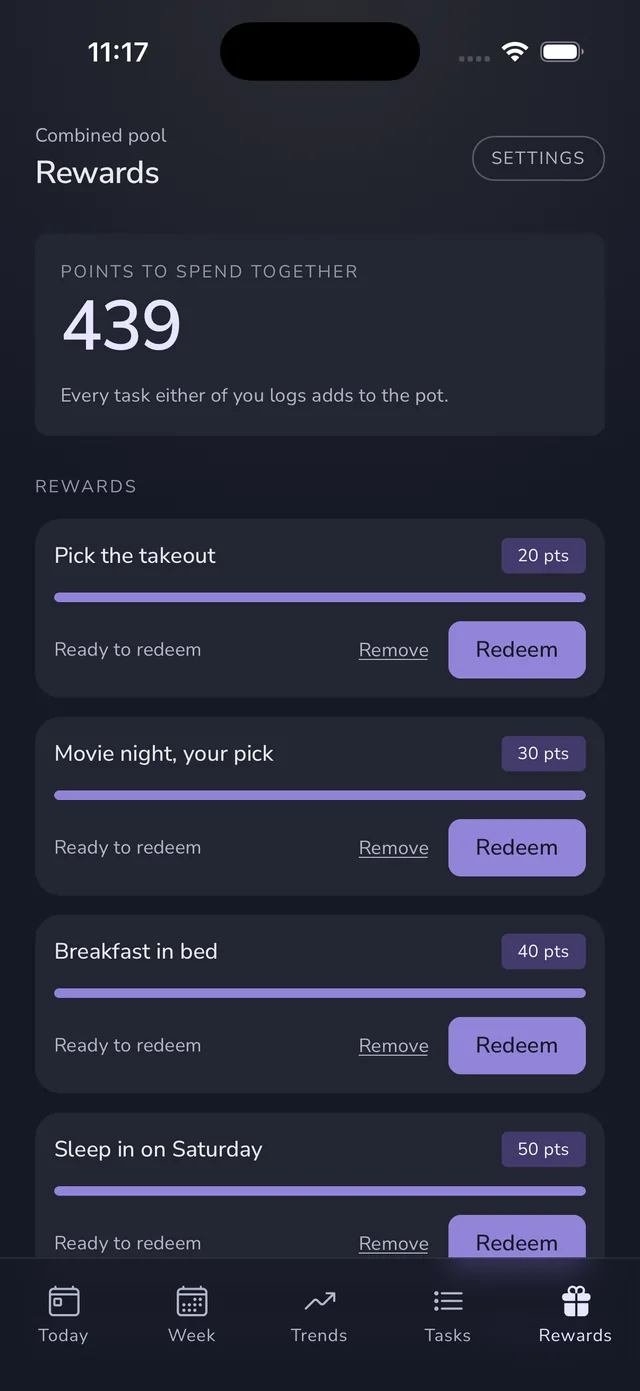
  • Evenly Rewards screen: a combined points pool and rewards to redeem together

    One pot, spent together

    Everything you both do earns points toward treats you choose as a pair.

Small app.
Big difference at home.

1

One dial

The whole household in a single number you both understand.

2

Nudges a day, max

An evening reminder and a Sunday recap. Nothing else, ever.

6

Weeks of trends

Long enough to see a pattern, short enough to act on it.

0

Verdicts

Evenly shows the split. What you do about it is up to you two.

∞

Your own task library

Start from tasks that fit your home, then add anything else with the weight it deserves.

Up and running in an evening.

  1. 1

    Invite your partner

    Create your household and send a link, or share a six-character code.

  2. 2

    Tell AI about your home

    Describe it in a few words, or add photos, and AI suggests rooms and chores. Tick the ones that fit, then tune the weights together.

  3. 3

    Log as you go

    Tap a task when it’s done. The dial does the rest.

Fair chore splits, explained.

  1. →

    Chore split calculator

    Enter who did what this week and see the real percentage split between you.

  2. →

    How to split chores fairly

    A practical method for couples: list, weight, agree, check in weekly.

  3. →

    Household chore tracker

    What to record and five ways to track chores, compared.

  4. →

    Chore chart for couples

    A simple template, four ways to set it up, and why most charts fail.

  5. →

    What is the mental load?

    The invisible planning behind every chore, and how to share it.

  6. →

    Best chore apps for couples

    An honest comparison of the apps couples use.

Questions, answered.

What is Evenly?

Evenly is an AI-powered chore tracking app for couples. Describe your home and AI suggests your rooms and chores. You both log the household tasks you actually do, each task carries an effort weight, and a single dial shows how the load is split between you.

Is Evenly really AI-driven?

AI does the slow part: setting up. Describe your home in a few words, or add photos, and Evenly suggests the rooms, the chores and a sensible effort weight for each. You review the list and tick what fits, and nothing is added until you do. The dial and the weekly split are plain arithmetic on what you log, so they are never a guess.

What happens to my text and photos when I use the AI?

It is optional, and nothing is sent until you agree on a screen that explains it. When you tap Suggest, the description you typed, the names of your current rooms and chores and any photos you chose (up to four, location removed first) go to an AI provider, Anthropic, only to make the suggestion. Evenly does not store them. Each household gets a few suggestions a day.

How does effort weighting work?

Every task has a weight that reflects how much effort it takes in your home. Deep-cleaning a bathroom counts for more than taking out the bins. AI proposes a weight for each chore, Evenly ships with sensible defaults, and you can tune any weight together. Changes apply to future logs only, so past weeks stay exactly as you logged them.

Will this turn chores into a competition?

Only if you want it to. Cooperative mode hides the lead and shows each person’s contribution instead of a winner. Points you both earn go into one shared pool, and spending them is a joint decision.

How many notifications does Evenly send?

Two nudges a day at most: one gentle evening reminder to log, and one weekly recap on Sunday. Nothing else.

Can we add our own tasks?

Yes. When you set up, describe your home or choose what it is like, for example a new baby, just moved in together, or both working from home, and tick the tasks that fit. Later, tell the AI what changed, such as a new pet or a second bathroom, and it suggests only what is missing. You can also add custom tasks with the weight that suits your household.

What if we forget to log something?

You can catch up on yesterday: switch to Yesterday, log what you did, and it counts for that day. Only yesterday, so a week that has already been talked about can’t be quietly rewritten. Or tick everything you did in one go with Log several at once.

Can chores repeat or rotate?

Yes. Any task can repeat daily, every few days, weekly or monthly, and can be open to anyone, assigned to one person, or rotate between the two of you. Today shows what is due and whose turn it is.

How do I invite my partner?

Create your household and Evenly gives you a six-character invite code and a link to share. Your partner opens the link, or enters the code in the app, and joins your household.

Does it work on iPhone and Android in the same household?

Yes. Evenly is coming to iOS and Android, and there is also a web version that runs in any browser, so one of you on an iPhone and the other on an Android phone can share a household and see the same dial.

When can we get Evenly?

Evenly is in development for iOS and Android, and you can try the web version at app.evenlyathome.com. Join the waitlist and we’ll email you when early access to the phone apps opens.
Meet in the middle.

Be first to try Evenly when early access opens.

We only use your email to tell you when Evenly launches. Privacy policy